


Best Charting Software: It’s always a compromise

There are so many choices it takes me 4 videos to narrow down the options! If you’re just getting started as a trader, your choice of charting software can have a big impact on how quickly you learn.
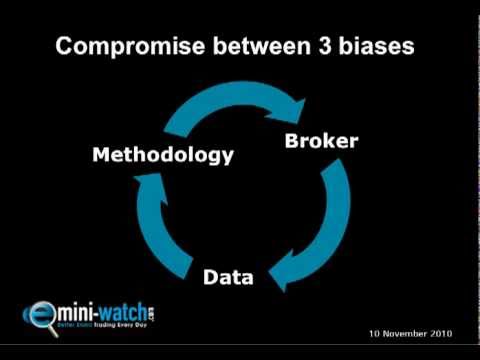
Choosing the best charting software for you is always going to be a compromise. You have to trade off 3 factors: methodology, broker and data. That is, does the charting software have all the tools you need to follow a particular methodology? Does the charting software allow you to use your preferred broker? Does the charting software give you access to the right data feed for you?
Where you live matters too. In Canada the broker question narrows fast: TradeStation takes no Canadian brokerage clients and NinjaTrader’s brokerage is open to Ontario residents only. See NinjaTrader Canada and TradeStation Canada: who can trade for what works in each province.
Depending on what kind of trader you are, each of these 3 factors will have different significance. For example, if you’re an Elliott Wave follower you should choose the charting software package that gives you all the right Elliott Wave tools. If you’re an automated system trader then you need a charting software program that links with your broker (plus gives you all the right system backtesting tools). If you trade more unusual markets (e.g. Italian bonds or Swedish equities) then having access to that data will be of paramount importance.
But there’s also a fourth kind of charting software - programs that seek to be more “all things, to all people” and are more ‘open’ in their design. These allow you to import or design your own tools. They have APIs for linking with a few different brokerages. And they give you access to multiple data feeds. For traders starting out, they are often a good compromise between each of these 3 factors: methodology, broker and data.
Best Charting Software: What packages are reviewed?
In the 4 videos above, I divide about 50 different charting software packages into these 4 groups: methodology, broker, data and open. Then for the ‘open’ group I shortlist and review in more detail 6 different charting software choices:
- eSignal
- Metastock
- MetaTrader
- MultiCharts
- NinjaTrader, and
- TradeStation
I go through the pros and cons as I see them and also estimate the monthly cost of running each charting software package. At the end of the day, you have to do your own research - check the tools you need are included, test the data feed for accuracy and stability, try the usability, look and feel, etc. - but hopefully my comments help you to evaluate your charting software options.
Before making your final decision, make sure to:
- Check out the individual forums
- Read EliteTrader.com and Trade2Win.com reviews
- Read trader magazine reviews
- Google search: platform + review/problem/issue, and
- Sign up for a free Demo
Update June 2011 - TradeStation & NinjaTrader Observations
Based on email feedback from followers over the last year:
TradeStation is very user-friendly - For some reason, traders have the impression that TradeStation is a complex charting platform. However, once they try the demo the overwhelming reaction is that TradeStation is very easy to use and “rock solid.
NinjaTrader support is very good - I get more troubleshooting questions from NinjaTrader customers than TradeStation or MultiCharts. NinjaTrader users are less experienced than users of other charting platforms, and that accounts for some of the questions. NinjaTrader is also (in my view) a little less stable than other platforms. However, NinjaTrader support is excellent - they are very responsive and have a great attitude.
Best Charting Software: Useful links to demos
You can get free Demos of most of the best charting software packages. Do it! It’s well worth it - you’ll discover things that you’d never know from reading a website and get a real feel for the best charting software for you.
The importance of signing up for a free Demo cannot be underestimated - it will save you time in the long run. Below are links to Demos of the 4 most impressive charting software packages:
So there you go, some thoughts on the best charting software.
Best Charting Software - Reader Comments
Thanks for the platform videos!! They put into perspective and add to what has taken me 3 years of painstaking enquiry to get a grip on. If only I had been able to see them 3 years ago.
Alan T.
Great info. I agree with you that TradeStation offers a GREAT DEAL on commissions … volume at the bid/ask is just so wonderful that they do that!!! … I was VERY SURPRISED you didn’t even mention ThinkOrSwim … I get the suspicion that you do not like ThinkOrSwim, but what do I know!! haha … Anyway thanks again and really thanks for EVERYTHING here - to express all the support I’ve gotten from your blog and posts is very hard to do. Thank you again.
Mario T.
I think that this was a great video with a lot of information. It is good to have this for a reference. For myself, I have TradeStation and NinjaTrader, and so far I am happy with both of them. There are times when the markets are moving fast that TradeStation is not able to keep up with the movement of the market. I hope this is something that they are looking at to improve. But when their charts are keeping up, I like them better than Ninja.
Christian F.
Market Delta was not mentioned … Yes, there are plugins to NinjaTrader for footprinting, etc. but all told they just aren’t as good as Market Delta … Appreciate you and your work.
Joe D.
I just watched the What is the Best Charting Software video again and just wanted to say Thank you! Thank you! Thank you!
Christian F.
Just watched your reviews of charting software and data feeds. Extremely powerful, comprehensive and unbiased evaluation! You hit another home run. I seem to watch your videos 5 hours every week-end and am starting to feel guilty for such a free service I know you are paying for. Anyway, your elegance, tone and tenor, as well as the unbelievable depth of knowledge you have has made you my ‘Futures Professor from Oxford.’ I’ve said it all … thanks for your time.
Lawrence P.
I wish I’d found your review of trading software 2 years ago. Excellent service.
Ron S.
I just wanted to write you a quick note to say thank you for your fabulous resource. Your 4 videos have been, by a distance, the easiest to understand, most comprehensive and unbiased free resource that I have found. It is a brilliant gem and is worthy of far greater distribution. Congratulations and keep up the good work.
Michael S.
Glad I’ve moved over to TradeStation. Has a much nicer feel to it than NinjaTrader. Plus the data cost is next to nothing if you do the minimum trades a month. Sweet. Thanks again Barry.
Chris G.
An excellent series of videos that allows for a first cull of charting options. If you haven’t yet settled on which market to trade, the guide on which markets are best for day trading is a good starting point. The trading books I’d recommend are worth adding to your reading list too.
Philbert N.