
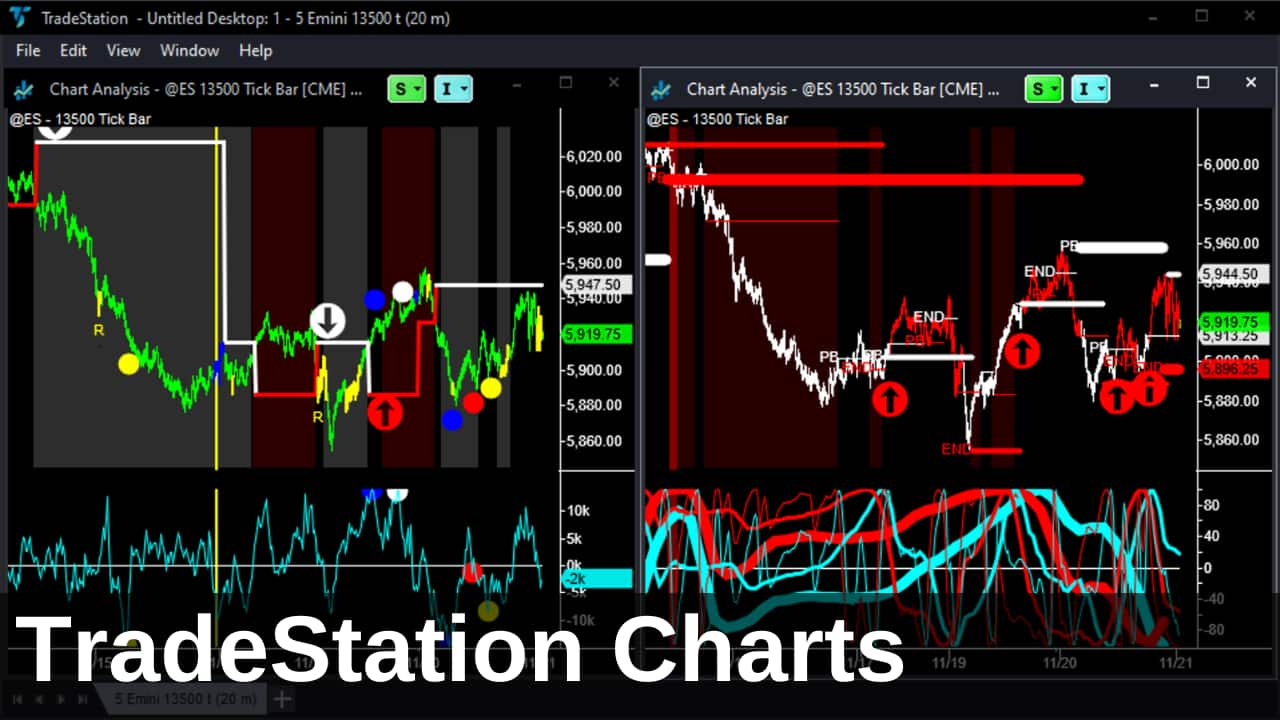
I’ve been using TradeStation charts for nearly 20 years, and before that, I used SuperCharts – the predecessor to the TradeStation platform. With over 25 years of TradeStation experience, I’ve compiled my top tips for getting the most out of TradeStation.
From backing up your charts and files to optimizing your platform with continuous futures contracts and hotkeys, I’ll guide you through everything you need to streamline your trading setup. You’ll also discover how to manage indicators across multiple charts, set up alerts, and maintain a stable internet connection for uninterrupted data flow. Let’s dive in!
Table of Contents
Use the links above to jump to the TradeStation Charts topic that interest you.
TradeStation Chart and Symbol Setup
Why use “continuous” futures contracts
I see so many charts from traders where they’ve plotted the current futures contract (e.g. ESZ24). That’s great but they have to change it at rollover. If you use the “continuous” contract version (e.g. @ES) instead, the rollover happens automatically – plus, all the history is already on the chart.
Improved Continuous Contract Symbols
For Forex futures, we recommend using optimized continuous contract symbols that roll on the 2nd day before expiry – when volume shifts to the new front-month contract. For example, to do this for Euro futures use:
- Tick charts: @EC=102XC
- Minute charts: @EC.D=102XC
This avoids TradeStation’s default 3rd-day roll, which can include data from the prior, less liquid contract.
Why use 1440-minute intra-day TradeStation charts instead of daily charts
This hack is handy for getting volume data quicker. End-of-day volume data is delayed – the exchanges don’t release it until well after the close. But if you use a 1440-minute intra-day chart (1440 minutes = 24 hours), you’ll get the running total volume traded and know the daily volume before the exchange releases it. Sometimes, the exchange adjusts the figure, but it’s usually pretty close.
In addition, on a 1440-minute chart, TradeStation splits the day’s volume into “Up Volume” and “Down Volume”. “Up Volume” is volume traded at the Ask price and can, therefore, be considered aggressive buying. “Down Volume” is volume traded at the Bid price and can similarly be regarded as aggressive selling.
By keeping track of this “real” buying and selling volume, you can keep track of the strength of a trend. Breakouts into trends typically start with a large volume of aggressive volume. And trends peter out when the buying volume decreases, even as higher prices are printed.
So, this “real” buying and selling volume data is really useful.
What ‘Format Symbol’ settings should I use
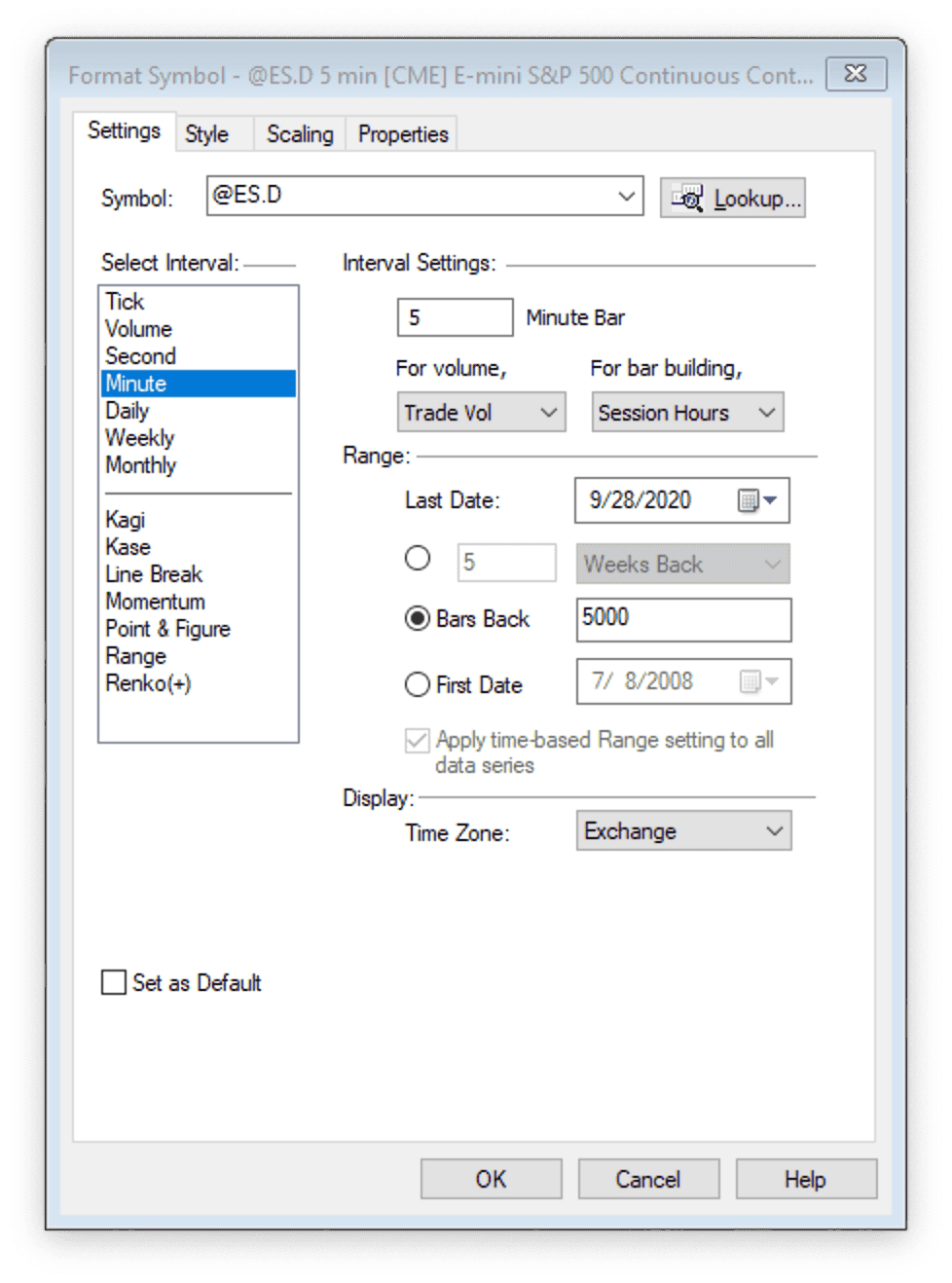
The TradeStation ‘Format Symbol’ settings tab can be confusing.
First, make sure your settings are “For bar building, use: > Session Hours” instead of “Natural Hours”. That way, TradeStation knows to start building bars at the beginning of the trading session instead of using whole hours.
Then, make sure your settings are “Time Zone: > Exchange”. So, the timestamps on your charts reference the exchange time rather than your computer time. This is just the convention traders use, so there’s no confusion when comparing charts from traders in different locations and time zones.
Lastly, use 5,000 bars back for history on your charts. This will give your indicators plenty of time to reach a “steady state” when calculating and updating.
Why link TradeStation chart windows with the same symbol
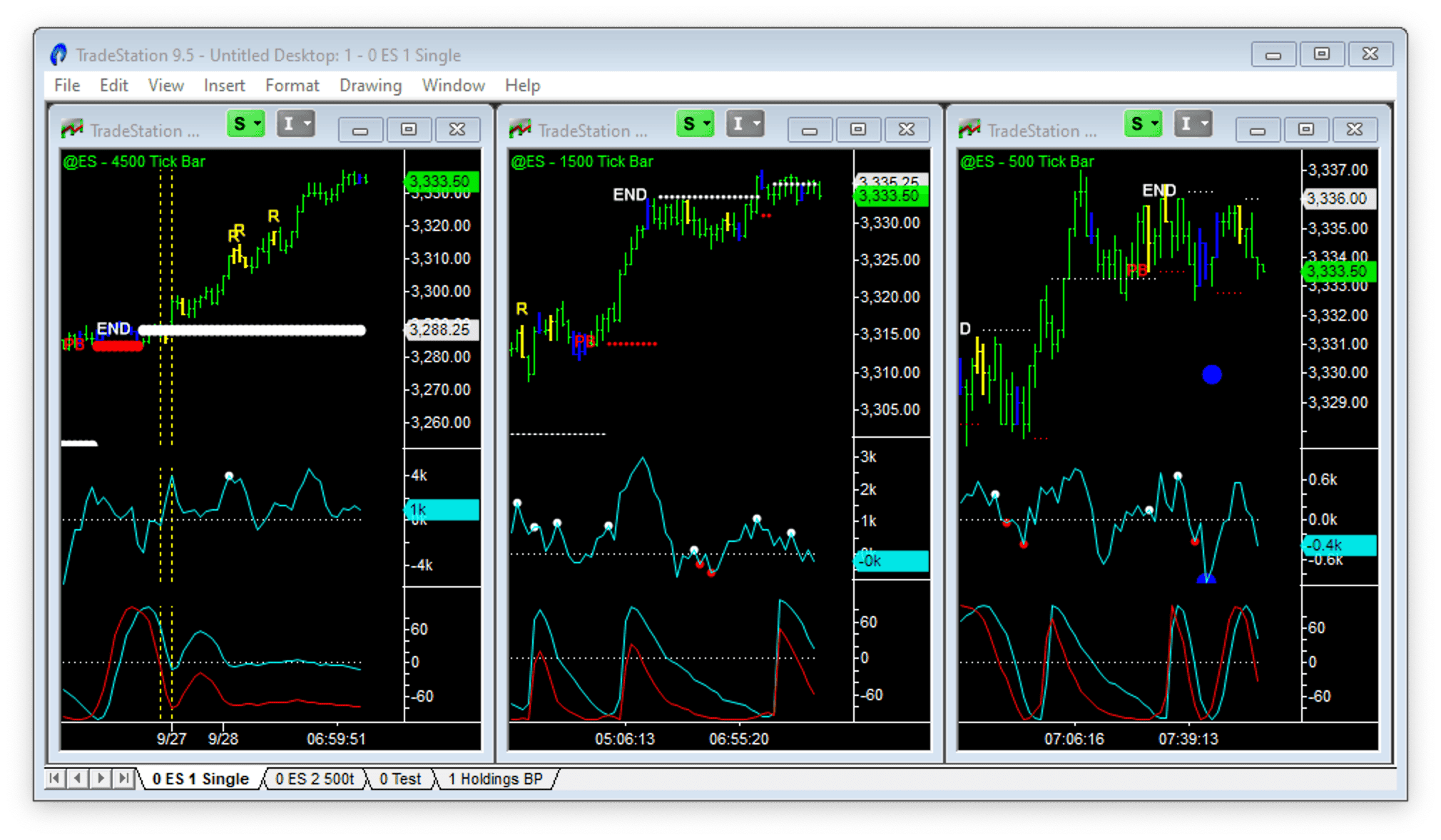
The symbol window link (“S” in the top right of each window) will combine different time frame charts of the same symbol. If you change the symbol in one chart – all the other charts will change too. It is convenient if you want to look at a sequence of symbols in different time frames. For example, daily, weekly and monthly charts for swing trading stocks. Or, in the case above, three tick charts – 500, 1,500 and 4,500 ticks.
You can also link symbols and timeframes. Use the interval window link (“I” in the top right of each window) to combine different symbol charts of the same timeframe. For example, you could set up all the major indices (S&P500, Dow, NASDAQ and Russell) in charts and then toggle between daily, weekly, and monthly views.
Why use Analysis Groups in TradeStation
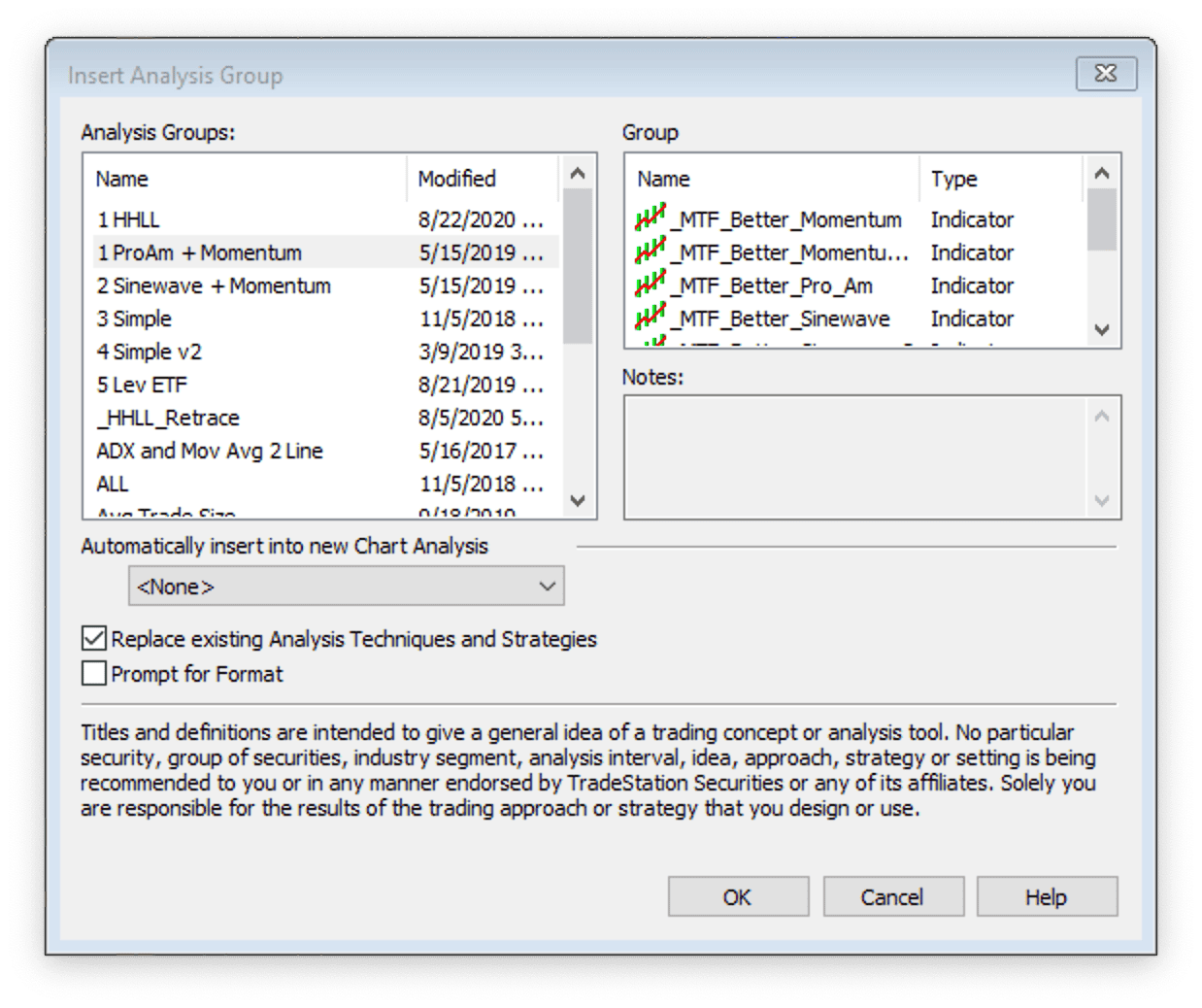
Combine your favorite indicators and their settings into an Analysis Group so you can add them to a chart with one “hit”. You can also add this indicator group automatically to any new chart you start.
Right-click on a chart takes you to several options – including the Analysis Group settings.
TradeStation Chart and Workspace Management
How to backup your TradeStation charts and EasyLanguage files
You’ve heard this before from me – backup, backup, backup. Do you think it can’t happen to you? Your hard drive fails, or you get burgled. Save yourself the stress and plan for disaster.
TradeStation has an inbuilt backup capability. Set this up to run automatically every week at 3 a.m. so it doesn’t get in your way. In addition, every month, I export and save all my EasyLanguage files using the export wizard. These are saved on my hard drive, and then I use Google Drive to automatically backup all my hard drive files off-site, in the cloud.
There’s a full explanation in this article: Trading Backup Plan – My 7-Step Plan for Hardware Failure.
Why you need to rationalize and standardize your charts regularly
We all do it – try free indicators, look at different markets, and add complexity to our analysis. But “analysis paralysis” can be deadly – day trading decision-making needs to be fast, and having conflicting indicators or markets will tie you up in knots.
I suggest regularly going through your charts and deleting the ones that are not essential – do you really need that chart of the Japanese Yen versus the Swedish Krona?
Then, create a standard indicator Analysis Group that you can use for all charts and all time frames. It should have the minimum number of indicators with all the settings you like. Then apply it to all your charts – you’ll become quicker at reading them and see tradable patterns repeating. For me, the ultimate is just having one chart with all 3 of the Better indicators, trade entries, and exits signalled – and nothing else. One day…
How to change indicator settings quickly across multiple charts
Difficult to explain this one, but I’ll try. This is a very useful way of making global updates to indicator colors, lookback periods, etc.
//EasyLanguage Indicator Code: 200 Day Line

Variables: Length(200), HighColor(Red), LowColor(White);

Value1 = Highest(H,Length);
Value2 = Lowest(L,Length);

Plot1(Value1,"High",HighColor);
Plot2(Value2,"Low",LowColor);
Rather than go into every chart you’ve added an indicator to and change the colors, etc. – you can do the same by changing the EasyLanguage code once and re-verifying the indicator code. Just make sure the things you might want to change are coded as “Variables” and not “Inputs”. See the example code above.
How to set Hot Keys to move between TradeStation charts
It is an easy one here and already set up with the default TradeStation settings. You can select the workspace you want to view with control + page up/down. Then select the window (or chart) you want to be live with the control + tab. Finally, change the bar spacing with the up and down arrows.
Customization and Accessibility
How to setup Hot Keys for frequently used functions
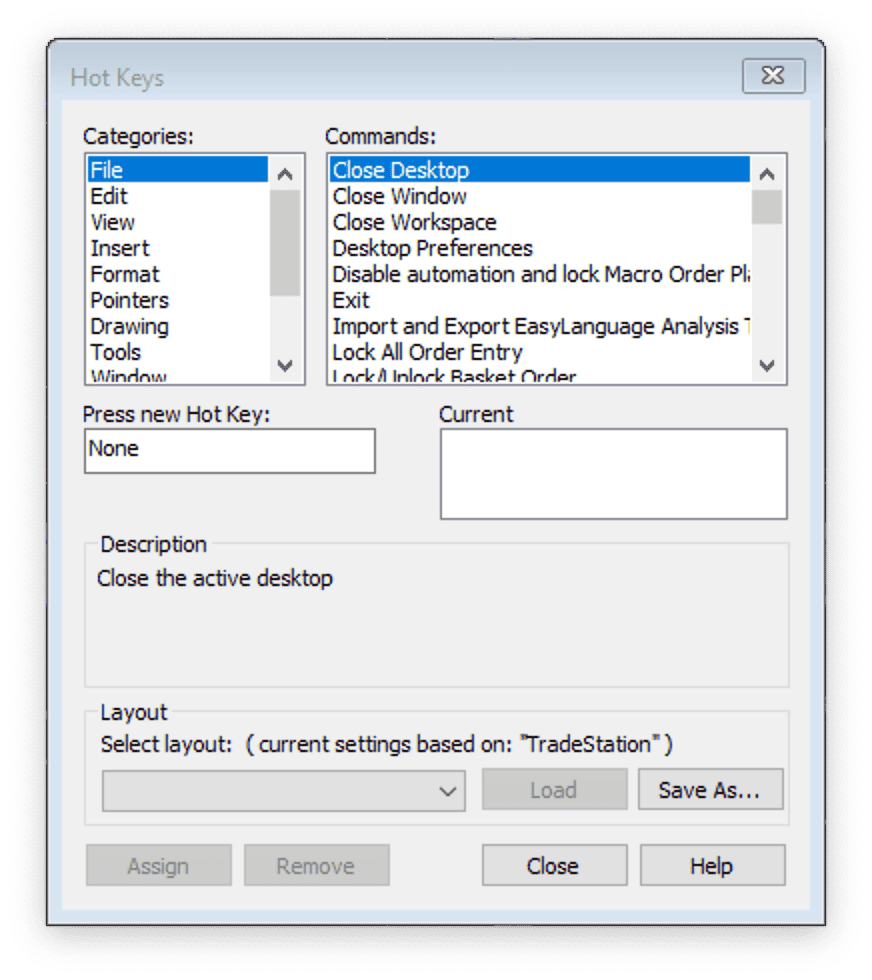
Hot Key settings can be found under View > Hot Keys. I have Hot Keys for new workspaces and new windows, copy/paste windows, workspace pointers, window pointers, changing workspaces, changing windows, etc.
You can move around TradeStation more quickly using the built-in or custom Hot Keys.
How to set Hot Keys for workspace and window pointers
If you use multiple time frame charts, you’ll often want to see where you are. Set up a Hot Key to add a pointer that shows where you are on all the charts open in a workspace. I use “]” to show the pointer in all windows (or charts) in a workspace. I use “|” to show the pointer in just one window (or chart).
It is useful for reviewing history and seeing what happened in each of the different time frames. I use it at the end of every day to review the day’s Emini trading and setups.
How to change the text size in TradeStation
I often get asked this question: “How do you change the default text size in TradeStation?” Well, here are the steps:
- Select Drawing > Text
- Write some text on your chart
- Right-click the text and Format the font, size and color
- Tick the “Set as default” box > OK
- Right-click and Remove the text
- Ctrl + R will update the chart with the new text formatting
Plus, any new chart will have this new text format.
TradeStation Performance Optimization
Why you need the fastest Internet connection possible
Your biggest bottleneck is not your computer processor speed, RAM, hard disk drive, operating system, etc. – it’s your Internet connection speed. Let me try and explain. Indicators are very simple – just a calculation loop repeated at the close of a bar typically. And computers are very good at doing repetitive calculations very fast.
Take the example of a dated computer running something like an Intel Core i3 at 3GHz. This processor will execute 50,000+ MIPS or million instructions per second. That’s 50 billion instructions per second. Now, it takes a few instructions for the processor to execute a complete calculation, so 50 billion instructions is roughly 5 billion CALCULATIONS per second.
Now, let’s compare that to your typical home Internet connection speed. Let’s assume you have “basic” cable and get a download speed of 4 Mbps – that’s 4 million bits per second or 0.5 million bytes per second. So your processor can run 5 billion calculations per second, but your Internet connection only delivers 0.5 million bytes of data per second.
Your computer processor can run 10,000 times faster than your Internet connection!
I’m not a computer engineer, and some of my assumptions might be out – but I’m sure you understand. Have you ever wondered why Goldman Sachs wants to co-locate its computers next to the exchange’s computers? Now you know. The days of upgrading your RAM, computer processor and graphics card are over – they’re moving at warp speed compared to your basic Internet.
And when measuring your Internet connection’s speed, don’t forget to measure to the server delivering the data – not your local server. In my case, this is the difference between measuring the speed to a Sydney suburb in Australia versus Texas (where the TradeStation data servers are located). Measure network latency as well as throughput. They both impact response time. A few years ago:
- My local Sydney server gave results of 60+ MBps throughput and 10 ms latency.
- The Texas servers gave 2-4 MBps throughput results and 250 ms latency!
How to tell if your Internet connection is “glitchy”
Again, if you’re a heavy user of Tick charts like me, you must know you’re receiving every “tick” of data in the data feed. If your Internet connection and/or WiFi signal is “glitchy” you’ll experience “micro-outages” and data packets will be lost, technically called “Jitter”. There are various online tools for measuring packet loss and Jitter, including this one.
However, TradeStation also has a useful built-in function that can help measure “micro-outages” and tell you if you have a problem. A symbol ‘== BYT’ chart shows TradeStation bandwidth usage (in Kbits/second) every second.
Symbol ‘== BYT’
You need a space between the symbol’s ‘==’ and ‘BYT’ letters. If you leave the space out, you’ll get a “Data request failed: incorrect symbol” error message.
Keep this chart running during the trading day session (with your usual tick bar charts for trading also open), and if the indicator line plotted ever hits zero, you’ll know that you missed some data. The odd zero plot shouldn’t be a concern, but if you are showing multiple consecutive zero plots, your Internet and WiFi connection are poor – and you’ll need a fix!
You can also be alerted whenever you have data glitches by adding the ‘Data Flow Lost’ indicator by JRG (search the TradeStation forums for the code) to a 1-tick ‘== BYT’ chart described above. Here’s a snippet of the indicator code:
//Data Flow Lost Indicator

Inputs: Alert_Start_Time(0930), Alert_End_Time(1615), Alert_Every_X_Ticks(5);
Variables: Counter(0);

If Time >= Alert_Start_Time and Time <= Alert_End_Time and DayOfWeek(Date) > 0 and DayOfWeek(Date) < 6 and Close = 0 then begin
	If Mod(Counter,Alert_Every_X_Ticks) = 0 then
		Alert("Data Failed");
		Counter = Counter + 1;
	End
Else Counter = 0;
How to clear the TradeStation cache
This is one of the most valuable fixes I know of – particularly for heavy users of Tick charts like me.
If your tick charts are slow to load, your cached data may be corrupted. Alternatively, if you have a poor Internet connection with “micro-outages”, your tick charts may show gaps. Both of these problems can be fixed by rebuilding your cache. Here are the steps in TradeStation:
- Shut down TradeStation.
- Find the cache folder:
- In TradeStation 9.5, it is here:
C:\Program Files (x86)\TradeStation 9.5\Program\Cache - In TradeStation 10, it is here:
C:\Users\[UserName]\Documents\TradeStation 10.0\CAL\Cache - In TradeStation 10 on a Mac, it is here:
Z:\Users\[UserName]\Documents\TradeStation 10.0\CAL\Cache
- In TradeStation 9.5, it is here:
- Re-name the cache file, don’t delete it:
- In TradeStation 9.5, re-name Cache to Cache_old.
- In TradeStation 10, re-name CAL_cache.clod to CAL_cache_old.clod
- Re-start TradeStation and open some of your charts.
This will force TradeStation to access the historical data on their servers and rebuild your data cache. Do this outside the trading day, as the data downloading will be slow. Try it! It works like a treat every time.
How to access TradeStation through a Firewall
If you’re behind a firewall, when you try to log into TradeStation, you’ll be told you are not connected to the Internet. Then TradeStation will cycle through continually trying to get a connection but fail. You can use the Terminal application to check by typing “telnet 63.99.207.100”. This asks for a Telnet connection to one of the TradeStation data server IP addresses. If “Unable to connect to remote host” comes back, you’re behind a firewall.
Quick workaround: ExpressVPN
If you’re looking for a quick workaround to bypass a firewall, a VPN, like ExpressVPN, might work. When traveling, we’ve encountered some hotels using a firewall, and logging into TradeStation using a US VPN connection has worked. It’s definitely worth trying, and a VPN service is worth subscribing to anyway.
To bypass the firewall, here are the specific instructions you need the network administrator to follow. It looks complicated, but to a network guy, it should be straightforward.
Ask your network administrator to make these changes:
Incoming and outgoing TCP/IP connections through ports 11000, 11001 and 11020. Incoming and outgoing TCP/IP connections to the following IP addresses:
3.18.24.98
52.14.156.113
3.19.136.234
3.134.162.9
3.12.205.55
3.12.81.146
18.219.167.41
3.21.107.220
18.188.138.17
3.15.116.94
3.128.83.78
3.136.222.234
3.19.170.180
18.190.71.20
3.16.244.249
3.23.71.155
13.59.34.118
3.20.168.91
3.130.42.151
3.20.83.229
18.219.167.41
3.12.81.146
3.21.107.220
3.23.117.85
3.20.213.230
3.134.22.56
3.132.113.193
3.23.2.35
3.18.198.250
3.226.43.250
34.192.110.71
18.208.12.108
34.231.101.234
100.25.62.72
52.4.21.160
3.214.58.246
34.205.190.244
35.170.224.48
35.170.220.125
54.158.176.209
prt01.dfs.tradestation.com
prt02.dfs.tradestation.com
prt03.dfs.tradestation.com
prt04.dfs.tradestation.com
prt05.dfs.tradestation.com
prt06.dfs.tradestation.com
prt07.dfs.tradestation.com
prt08.dfs.tradestation.com
prt09.dfs.tradestation.com
prt10.dfs.tradestation.com
prt11.dfs.tradestation.com
prt12.dfs.tradestation.com
Note: TradeStation suggests you contact Customer Services to obtain the latest IP list. This list is correct as of 18Oct20.
Alternatively, use a VPS, which stands for Virtual Private Server. This virtual computer is effectively connected directly to the Internet backbone and hosted by an ISP. You access this virtual computer through any computer with an Internet connection (what we used to call a “dumb” terminal) using Microsoft Remote Desktop Connection (or another Mac app).
The beauty of this approach is that your virtual computer has a high-speed connection to the Internet and trading data – plus, it can be very highly spec’d and only run your trading platform, achieving maximum performance. Then, your terminal computer needs a minimum Internet connection to “see” and control the virtual machine.
TradeStation Alerts and Coding
How to code and set alerts in TradeStation Charts
Coding and setting up alerts in TradeStation is not straightforward. The video above explains how to code and set alerts in TradeStation – and includes three tricks you need to know to get it right:
- Use nested if/then statements with one for the alert condition and one for the alert notification
- In the indicator settings, both the MyAlert Input needs to be set to True and the ‘Enable Alert’ checkbox, under the alert tab, needs to be ticked
- The ‘Alert Continuously’ radio button under the alert tab needs to be selected
Here’s an example of the EasyLanguage code I used in the video. You can copy/paste it and change the conditions to make it your own.
//Example TradeStation EasyLanguage Alert Code

Inputs:	MyAlert(True);

Condition1 = C > H[1];
Condition2 = C < L[1];

If Condition1 then begin
	If MyAlert = True then begin
		Alert("Bullish Alert " + Symbol + " " + NumtoStr(BarInterval,0));
	End;
End;

If Condition2 then begin
	If MyAlert = True then begin
		Alert("Bearish Alert " + Symbol + " " + NumtoStr(BarInterval,0));
	End;
End;
How to learn TradeStation EasyLanguage
All traders need (at least) basic coding skills. TradeStation EasyLanguage is excellent – simple enough to pick up quickly and complex enough to do some nifty analysis. Sure, you C++ and C# coders can do anything – but it’s too hard for me. Plus, I’m an old dog and stuck in my ways.
Here are some TradeStation EasyLanguage resources to get started:
- TradeStation EasyLanguage PDFs
- TradeStation EasyLanguage video tutorials
- Martyn Whittaker’s video tutorials and guides
- TradeStation Forum and search function (you need to be logged in for access)
If you’ve never coded – give it a go. You might be pleasantly surprised by how easy TradeStation EasyLanguage is.
Why you should read the TradeStation manual
It’s unfashionable to read manuals these days – software should all just work and be intuitive, right? Wrong. Charting software is some of the most complex out there and takes years to master, particularly if you write your own code.
But getting answers is a lot quicker these days. Manuals usually come in PDF or online format and are searchable. Forums are a fantastic resource – and one of the keys in deciding which charting software to use – make sure you’ve bookmarked yours. If you’re having a problem or curious about how something works in TradeStation, I guarantee there’s a forum thread or article written about it.
If your data is not updating or one of your charts doesn’t look right – check the forums (or Twitter/X) first. The exchange might have done something; other traders might have identified the problem too – you’re not alone.
(Note: TradeStation Network Status has never worked for me to show real-time problems. It invariably shows all green lights, and everything is working fine. Not.)
How to get more answers to TradeStation FAQs
Can’t find it in the manual? Don’t read manuals! Then, use Google instead. Type this into the Google search box:
site:hhtps://tradestation.com “search term”
This will restrict the Google results to the TradeStation site, including the very useful TradeStation forum. Alternatively, search for “search term” plus TradeStation or EasyLanguage.
So there you go. I hope you found these TradeStation FAQ answers and time-saving tips helpful.